💡Good to know! First step! If you would like to set up all you can eat and working with a POS-system you create your arrangements and articles in your POS. Through the synchronization it will be available in Jamezz.
In the left menu you have arrangements and there you find arrangement groups and arrangements.
Arrangement Group: A category of menu items (like "Food" or "Drinks") that share the same credit cost and ordering rules. Groups determine how much each item costs and when customers can order them.
Arrangement: The complete AYCE package that customers purchase (like "AYCE Dinner"). This defines the overall rules: how many credits per round, time limits, round intervals, and which groups are included.
It is important to follow the steps:
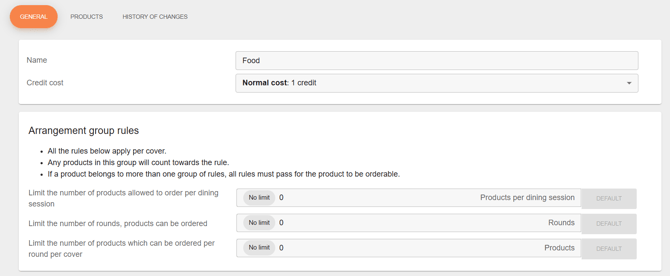
Step 1. Click on Arrangement Groups and than on the button + CREATE NEW GROUP. For example you set up a FOOD group. In the general tab you set up the general settings like: the name of the arrangement group, the credit cost and the rules of the group.
Credits: Choose the appropriate cost structure for your group:
- Normal Cost (1 credit): Standard items that cost 1 credit per item
- High Cost (2 credits): Premium items that cost 2 credits per item
- Outside Arrangements: Use this for drinks that customers can order outside of the round timer and will cost 0 credits
- No Cost: Items that cost no credits, but cannot be ordered outside the round timer.

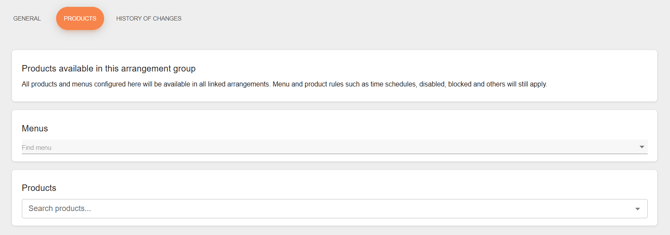
After that in the next tab: PRODUCTS you can set up all products that would be available in this arrangement group. You can edit directly a whole menu or products.
Step 2. Go to arrangements in the left menu.
If you had clicked on arrangements you can create a new arrangement with the button + CREATE NEW ARRANGEMENT. You can see the next settings, let us example this things.
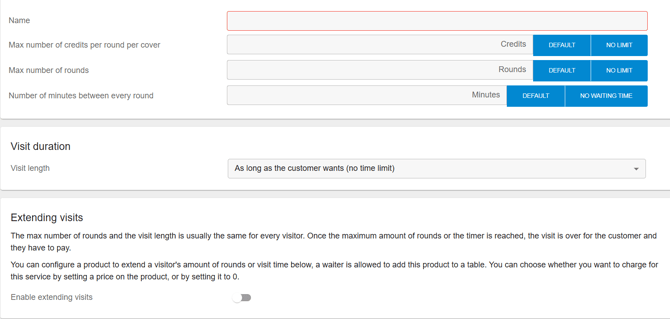
Max number of credits per round per cover: Maximum credits per round per cover.
Max number of rounds: How many rounds can the customers order?
Number of minutes between every round: For example 10 minutes before you can order round two after order one is ordered.
Visit Duration: You can choose no time limit or select a specific duration. This must be set in minutes, so 120 minutes equals 2 hours.
Enable extending visits: If a customer's time is almost up and they ask for more time, this is possible by connecting a POS product (you can name it "15 min"). Adding this product to a table will extend the time by 15 minutes:
Step 3. In the second tab from arrangements, you can set up arrangement indentifiers. Here you can add the arrangements products from your POS. In the third tab arrangement groups you add the arrangements groups that you create earlier: for example: food, drinks, sides and service.
Last step: To use the arrangements you need to click in the left menu on Sales area. After that you can edit with the pencil icon the salesarea to navigate to the tab Arrangements and enable the switch shown below:
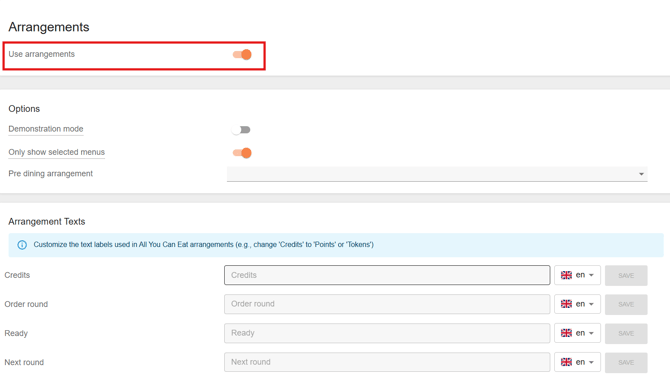
Important to know! If you would like to have pre dining that means that for example the drinks can be ordered before the arrangement starts you can add a per dining arrangement and add here you pre dining arrangement.