Pickup delivery webshop settings:
On this page in your sales area you set up the important basic things for webshop. Most of the time you have two sales areas one for take-away and one for delivery because some settings are different.
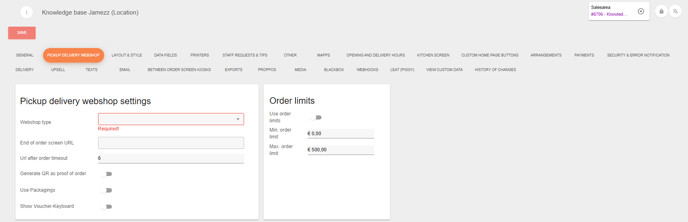
In the picture you can see that it is required to select the type of the webshop. It is only take-away or delivery that you can choose.
End of order screen URL: This is the redirect of the front end whenever people are done ordering, normally with a kiosk we put the link here from the table that is being used for the kiosk.
URL after order timeout: has no function at this moment.
Generate QR as proof of order: This lets you generate a QR code that will be included in the mail, this QR can be used to verify orders in our Kitchenscreen.
Order Limits:
Use order limits: Here you can enable or disable order limits for your customers, this let's you limit the x amount that people can order.
Min. order limit: The minimum amount that people can order.
Max. order limit: The maximum amount that people can order.