First of all, you need a discount definition before you can make discount vouchers. In this article you read more about how to set up discount definitions: https://knowledge.jamezz.com/knowledge/vouchers-coupons-discountdefinitions
After that, to get to Vouchers codes, go to "Voucher & Coupons" in the left window and click on Discount Vouchers.
To make a new one you can press on the button: + NEW VOUCHER.
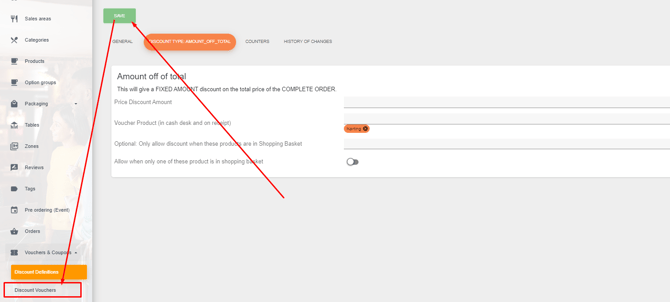
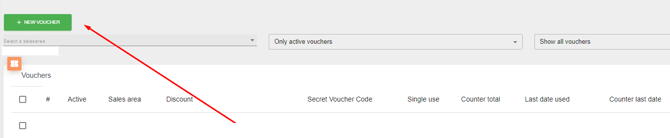
With this button you get a few questions:
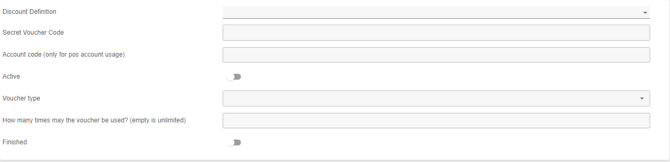
Let us explain the settings:
Discount Definition: Here you can give the voucher you created a definition (name).
Secret Voucher Code: Here you can again give a name to the voucher that the customers can use as a discount code. Usually this name corresponds to the discount definition.
Account code (only for pos account usage): Here you can indicate if the discount code can only be used by the cashier.
Active: Here you can indicate whether the discount voucher should be active or not.
Single-use: If you turn this on, the discount code can only be used 1 time.
Finished: Here you can indicate whether the discount code has expired. From that moment on, the code is no longer valid.
But there is an alternative solution to make more voucher codes at the same time. You navigate back to the discount definitions and click on this button:

With this button you can create more voucher codes at the same time. You get a pop-up with some questions.
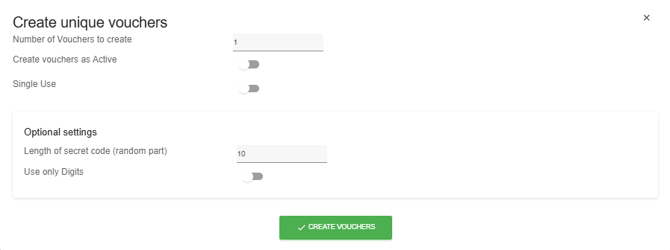
The voucher codes you will see in the BackOffice of Jamezz in Discount Vouchers.